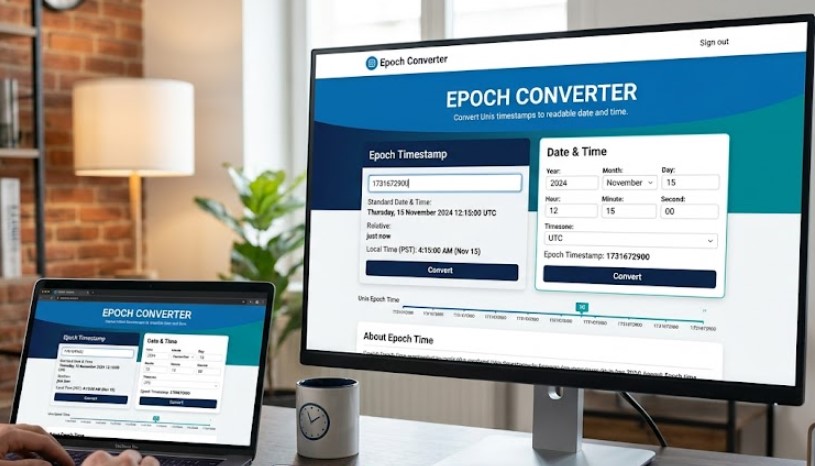
Epoch Converter: To Instantly Convert Unix Timestamps to Human-Readable Dates
Epoch Converter is so important in today’s world of software and apps development which is rarely stored as “April, 9 2025 3: PM”. On the other hand, when we talk about the digital world, we come to know that computers use a very simple and lean type of universal system, which is called Unix Timestamp, or in some regions also called Epoch Time.
To easily understand the Unix Timestamp Converter tool, I want to tell you in simple words that the total number of seconds which are elapsed after January 1, 1970, at 00:00:00 UTC, and this date is recognized worldwide as the Unix Epoch Date.
As an example, when you see the epoch timestamp converter data of 1700000000, it generally means that exactly 1.7 billion seconds have been passed since the 1970 New Year’s Day. So the system is universal, as every server that is properly configured on earth returns to the same number on this second. Therefore, the current timestamp SQL Server format is very important for the developers. Most importantly, this system works in all time zones of the world. So there is no AM/PM, no confusion, and no MM/DD/YYYY confusion.
Convert Epoch to Human Date
Convert Human Date to Epoch
Multi-Language Sub-Tools & Cheat Sheets
Select a language platform below to check snippet implementations for calculations.
JavaScript Timestamp Conversion
const msTimestamp = Date.now();
const unixSeconds = Math.floor(Date.now() / 1000);
const dateObject = new Date(unixSeconds * 1000);
console.log(dateObject.toUTCString());
PHP Timestamp Conversion
<?php
$currentEpoch = time();
$epochInput = 1716912345;
$humanReadable = date('Y-m-d H:i:s', $epochInput);
$epochBack = strtotime("2024-05-28 16:05:45");
?>
Python Timestamp Conversion
import time
from datetime import datetime
current_epoch = int(time.time())
epoch_input = 1716912345
human_date = datetime.fromtimestamp(epoch_input)
print(human_date.strftime('%Y-%m-%d %H:%M:%S'))
C++ Timestamp Conversion
#include <iostream>
#include <chrono>
#include <ctime>
// Get current system time metric
auto now = std::chrono::system_clock::now();
std::time_t current_epoch = std::chrono::system_clock::to_time_t(now);
Windows Batch Script Converter
@echo off
for /f "tokens=2 delims==" %%I in ('wmic os get localdatetime /value') do set datetime=%%I
set year=%datetime:~0,4%
echo ISO Human Timestamp: %year%
Microsoft Excel Conversion Formulas
# Epoch (Cell A1) to Excel Date representation:
=(A1 / 86400) + DATE(1970,1,1)

# Excel date value (Cell A1) back to raw Unix string:
=(A1 - DATE(1970,1,1)) * 86400
More Tools: Decimal to Binary Converter
Why Current Time Stamp Converter Is Important For Developers To Know?
The most important thing to know is the fact that an instant online epoch timestamp generator or timestamp converter is a technical miracle for machines, but also unreadable for humans. For example, as humans, when we look at 1678901234 looks very big in numbers, but it means nothing at a glance for machines. However, each of the developers has to divide these raw generated numbers into three of the critical area groups to easily understand the current simple epoch converter timestamps online:-
Epoch Converter Use In Debugging For Database Logs: Convert String To Timestamp Postgresql
Most modern databases (MySQL, PostgreSQL, MongoDB) store timestamps as integers rather than formatted dates. So, MySQL alter table add created_at timestamp shows the string timestamp tool appears typical log entry might be:
user_id: 405 | last_login: 1698849023 | action: purchase_failed
To debug why User 405's purchase failed, you must convert 1698849023 into a real date and time. Without a simple timestamp epoch reverse converter, you are staring at a meaningless number instead of seeing "Tuesday, November 1, 2023, at 6:30 PM UTC."
Timestamp Epoch Converter Use For Troubleshooting API Responses
Troubleshooting API Responses REST and GraphQL APIs almost always return time data in Epoch format, especially in webhooks or error payloads. A payment gateway might send:
{"error": "timeout", "timestamp": 1712345678}
You need a Unix Epoch Time converter online to translate that into a human-readable timeline, answering critical questions like: Did this error happen 5 minutes ago or 5 days ago?
Instant Simple Epoch Converter Use For Data Migration & ETL Tasks
When moving data between systems, you often find inconsistent date formats. The Unix timestamp converter tool is the neutral standard. Converting all date columns to integers first (using an Epoch converter reference), then reformatting them, prevents catastrophic parsing errors.
More Tools:- Hijri Calendar To Gregorian Date Converter
How To Convert Timestamp To Human Dates?
Converting a Unix timestamp (e.g., 1698849023) into something you can actually read. Like "Wednesday, November 1, 2023, 6:30:23 PM". It is straightforward once you know the three methods below. Whether you need a quick online timestamp converter tool or want to do it programmatically, here's how.
Method 1:- Use an interactive, simple, easy epoch converter.
If you want to simply convert a handful of timestamps, you must use a simple and easy-to-use Instant Epoch Unix Timestamp Converter here on our page by following these steps
Firstly, you should find the "Timestamp to date Converter" box on this page.
Now enter your numeric epoch Unix time stamp numbers, e.g., 1700000000.
Our Unix time converter will instantly show you two results.
UTC (Coordinated Universal Time): The raw, timezone-neutral version.
Your Local Time: Automatically adjusts to your computer's time zone (e.g., EST, PST, GMT+8).
Method 2:- Manual Calculation Without Using An Epoch Converter.
Ignore milliseconds. Most Unix timestamps are in seconds. If you see 13 digits (e.g., 1700000000000), divide by 1000 first.
Use an online reference. Since doing pure math in your head is impractical, remember that 86400 seconds = 1 day. Divide your timestamp by 86400 to get approximate days since January 1, 1970.
Add to the Epoch. Add those days to January 1, 1970, using a calendar. Note: This is tedious, hence why we use tools.
Method 3:- Use Timestamp Unix Converter Spreadsheet Formula For Batch Conversions.
Excel/Sheets Formula: =(A1/86400)+DATE(1970,1,1)
Assumes cell A1 contains your timestamp (e.g., 1698849023).
Then format the result cell as Format > Number > Date Time.
Watch out: Excel sometimes uses days since January 1, 1900 (a different Epoch). Always test with 0—it should return January 1, 1970. If it returns January 0, 1900, you're using the wrong system.
How to convert a date to a Unix Timestamp?
Sometimes you need to go the opposite direction. You know the exact date and time—say, "January 15, 2025, at 9:00 AM PST"—and you need the corresponding Unix timestamp (e.g., 1736946000) for an API request, database query, or cron job. Here's how to do it.
Method 1:- Using The Online Date Picker Tool, The Easiest Way.
Here on this page, you will find our effective, easy, and simple date-to-timestamp converter tool. Here is the easiest way to use it perfectly.
Select your date using the calendar picker (Year/Month/Day).
Choose your time (Hour/Minute/Second). Most tools default to 00:00:00 (midnight) if you skip this step.
Specify the timezone. This is critical. The same local time—like "3:00 PM in New York"—produces a completely different timestamp than "3:00 PM in London."
Click Convert. The tool returns an integer timestamp (usually 10 digits, no decimals).
Method 2:- Using The One-Liner in Code Epoch Converter (For Developers)
If you're building an application, use your programming language's built-in date library:
JavaScript Get Timestamp Milliseconds: Math.floor(new Date('2026-07-04T12:00:00Z').getTime() / 1000)
Python Epoch Converter: import datetime; int(datetime.datetime(2026, 7, 4, 12, 0, 0).timestamp())
PHP Epoch Converter: strtotime('2026-07-04 12:00:00 UTC')
Command Line (Linux/Mac) Epoch Converter: date -d "2026-07-04 12:00:00 UTC" +%s
Golang Epoch Converter:
Excel Epoch Converter:
Method 3:- Using The Spreadsheet Formula Excel Epoch Converter (For Batch Work)
If you need to convert a column of dates in an Excel epoch converter or Google Sheets? Use this method to get the desired results
Formula: =(A1 - DATE(1970,1,1)) * 86400
Assumes cell A1 contains a valid date like 1/15/2025 9:00:00.
Multiply by 86400 (seconds in a day) to get the Unix timestamp.
An important thing to take care of in this method is that Excel stores dates as days since January 1, 1900. Subtracting DATE(1970,1,1) gives you the days between the Epoch and your target date.
How To Batch Convert Logs And Data With Advanced Epoch Converter?
Converting one timestamp is easy. But what happens when your database exports 10,000 rows, your API returns a JSON array with hundreds of Unix timestamps, or your server log shows 5,000 entries like [1698849023] ERROR? Manually converting each one is impossible. You need batch conversion.
The Problem: Human-Unreadable Logs
In this problem, the raw application logs often look like this:
2025-03-15T10:00:00Z [INFO] User login
1698849023 [ERROR] Payment gateway timeout
1698849156 [WARN] High latency detected
1698849289 [INFO] Retry successful
That 1698849023 means nothing at a glance. But when you convert it, you discover: "November 1, 2023, 6:30:23 PM UTC"—critical information for tracing a production incident. Batch conversion turns a wall of numbers into a readable timeline.
Method 1:- Using a Batch Converter Tool (Fastest), Epoch Converter
Below, you'll find a batch conversion text area. Here's how to use it:
Copy your list of timestamps (one per line) from your log file or spreadsheet.
Paste into the input box of the batch epoch timestamp converter.
Click Convert Batch. The tool outputs a clean table:
Method 2:- Using Command Line with awk and date (For Servers) Epoch Converter
If you're already SSH'd into a Linux server examining logs, you don't need a web tool. Use this one-liner:
awk '{print strftime("%Y-%m-%d %H:%M:%S", $1)}' timestamps.txt
The input file (timestamps.txt) contains one timestamp per line.
Output: Human-readable dates, line by line.
For a single log line with embedded timestamp:
echo "1698849023 ERROR" | awk '{cmd="date -d @"$1" +\"%Y-%m-%d %H:%M:%S\""; cmd | getline $1; close(cmd); print}'
Method 3:- Using Epoch Timestamp To Date Python Script (Most Flexible) Epoch Converter
import time
timestamps = [1698849023, 1698849156, 1698849289]
for ts in timestamps:
print(f"{ts} -> {time.strftime('%Y-%m-%d %H:%M:%S', time.gmtime(ts))}")
Output
1698849023 -> 2023-11-01 18:30:23
1698849156 -> 2023-11-01 18:32:36
1698849289 -> 2023-11-01 18:34:49
Epoch & Unix Timestamp Reference Tables
Sometimes you don't need a converter. You just need to know: How many seconds are in a week? What timestamp represents midnight yesterday? When does the 2038 problem actually hit? These reference tables give you instant answers—no typing required.
Table 1: Time Unit Breakdown (Seconds)
Understanding the math behind Epoch time starts with these base values:
| Time Unit | Seconds | Why It Matters |
| 1 minute | 60 | Smallest practical unit for logs |
| 1 hour | 3,600 | API rate limit windows |
| 1 day | 86,400 | Standard log rotation period |
| 1 week | 604,800 | Metric aggregation cycles |
| 1 year (365 days) | 31,536,000 | Certificate expiration |
| 1 leap year | 31,622,400 | Rare edge cases |
Quick trick: To estimate any duration in seconds, multiply days by 86400. For 90 days: 90 × 86,400 = 7,776,000 seconds.
Table 2: Common Benchmark Timestamps
Use these known values to sanity-check your code or converter:
| Unix Timestamp | UTC Date & Time | Significance |
| 0 | January 1, 1970, 00:00:00 | The Unix Epoch (birth of Unix time) |
| 86400 | January 2, 1970, 00:00:00 | One full day after Epoch |
| 31536000 | January 1, 1971, 00:00:00 | One year (non-leap) after Epoch |
| 1000000000 | September 9, 2001, 01:46:40 | The 1 billionth second |
| 1234567890 | February 13, 2009, 23:31:30 | Aesthetic palindrome timestamp |
| 1700000000 | November 14, 2023, 18:13:20 | Recent reference point (2 billion is next!) |
| 2000000000 | May 18, 2033, 03:33:20 | The 2 billionth second (future benchmark) |
YouTube Timestamp Link Generator
A YouTube timestamp link generator is a tool or method that creates YouTube URLs starting at a specific time code. This is essential for skipping intros, highlighting key moments, or sharing precise sections of a video.
Method 1: YouTube's Native Method (Easiest)
YouTube has built-in timestamp link generation. Here's how:
Play the video and pause at your desired time.
Right-click on the video player.
Select "Copy video URL at current time" from the context menu
The link automatically includes the timestamp parameter. For example: https://www.youtube.com/watch?v=dQw4w9WgXcQ&t=43
Alternatively, click the "Share" button below the video, check the "Start at" checkbox, and copy the generated link
More Useful Tools: IBAN Generator Pakistan Online
Method 2: Manual URL Editing (For Precise Control)
You can manually add timestamp parameters to any YouTube URL. The format uses the t parameter.
Seconds only: &t=120 (starts at 2 minutes)
Minutes and seconds: &t=1m30s (starts at 1 minute, 30 seconds)
Hours, minutes, seconds: &t=1h2m30s
Method 3: Browser Extensions
For frequent timestamp generation, browser extensions streamline the process:
| Extension | Platform | Key Feature |
| YouTube Mobile - Timestamper | Firefox (Android/Desktop) | One-click timestamp link generation |
| YT-QuickStamper | Firefox | Exports timestamps in raw, hyperlinked, and Markdown formats |
Method 4: Mobile Apps (iOS)
For iPhone and iPad users, YT Time offers a dedicated solution
Copy a YouTube link from the YouTube app
Open YT Time (link auto-pastes)
Enter minutes and seconds
Tap "Copy URL" to share
Method 5: Embed Codes (For Websites)
When embedding YouTube videos on your website, the timestamp parameters differ slightly
| URL Type | Parameter | Example |
| Watch URL (standard) | &t=120 | https://youtube.com/watch?v=ID&t=120 |
| Embed URL | ?start=120 | https://youtube.com/embed/ID?start=120 |
Important: For embed codes, use start= (in seconds), not t=. If the URL already has a ?, use &start=120 instead.
Timestamp Formats Reference Table
| Format | Example | Result |
| Seconds only | &t=90 | Starts at 1:30 |
| Minutes & seconds | &t=2m15s Starts | at 2:15 |
| Hours, minutes, seconds | &t=1h5m30s | Starts at 1:05:30 |
Which YT Timestamp Generator Method Should You Use?
| Method | Best For | Speed |
| Right-click copy | Quick, one-off shares from YouTube | Instant |
| Manual URL editing | Precise timestamps or batch work | ~5 seconds |
| Browser extension | Frequent timestamp generation | 1 click |
| Mobile app | iOS users sharing from phones | 3 taps |
| Embed parameter | Website embeds with start times | Manual |
More Best Tools :- 8171 ویب پورٹل – BISP GOV PK 8171 Check With CNIC